

Quotations
Download PDF and share on WhatsApp
Send a branded PDF or share a link on WhatsApp in one tap.
3 min readBeginner
What you'll learn
- PDF matches preview
- WhatsApp pre-fills message
- Client phone from profile
1
Open the quotation
From Quotations, click the one you want to send.
2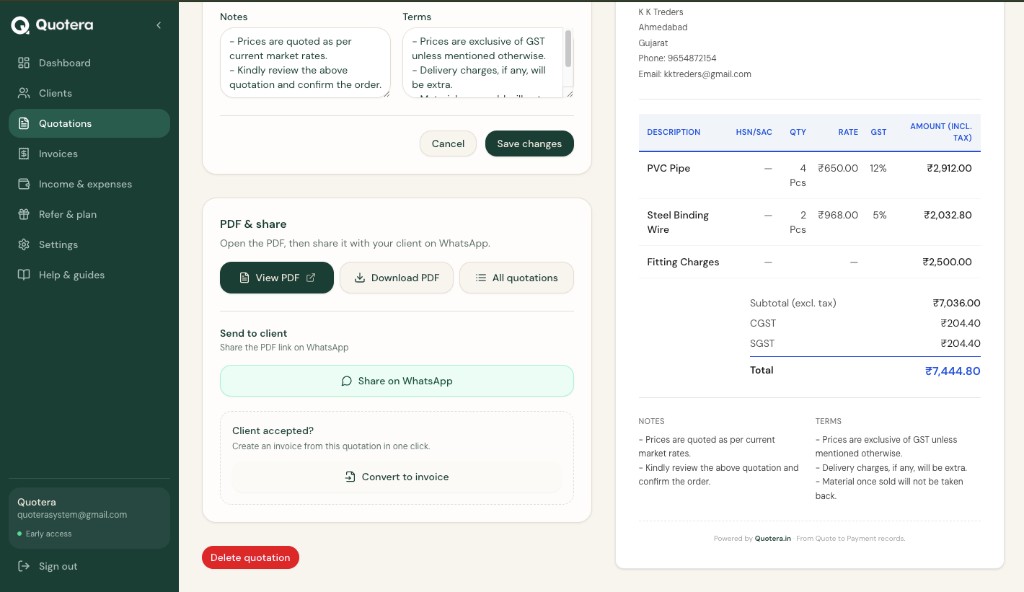
Download PDF and WhatsApp share buttons
Download or share
On the quotation page you can:
- Download PDF - save the file
- Share - get a link to send
3
Share on WhatsApp
Tap Share on WhatsApp. If the client has a phone number saved, WhatsApp opens with the message and link ready to send.
Tip: Add phone when creating the client for one-tap sharing.
Related guides
Common questions
Client needs an account?
No. They get a PDF link only.