

Clients
Add your first client
Save your customer's details once. Quotera fills them on every quotation and invoice.
3 min readBeginner
What you'll learn
- Clients → Add client
- Phone enables WhatsApp sharing
- GSTIN and state set correct tax
1
Go to Clients
Click Clients in the left menu, then add a new client.
2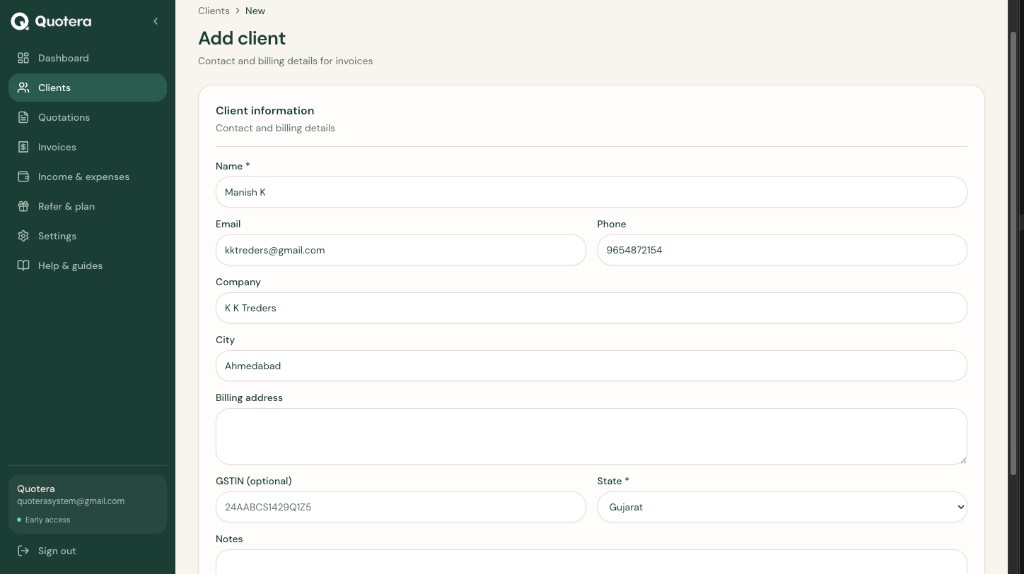
Add client form
Fill the form
Enter the details you need on documents:
- Client name
- Phone - used for WhatsApp share
- Email and billing address
- GSTIN and state (if GST registered)
3
Save
Click Save. The client appears in your list and can be selected when creating quotations or invoices.
Related guides
Common questions
Can I edit later?
Yes. Open the client from the list anytime.